GeneralAutofillEnabled
Interface AntView
Type: Property
Access: Read/Write
Data Type: Boolean
This property determines if the WebView2 control remembers what was typed before in your forms and uses that to offer the Autofill feature. Note that this is not related to saving passwords, for that feature look at the PasswordAutosaveEnabled property.
Default is true.
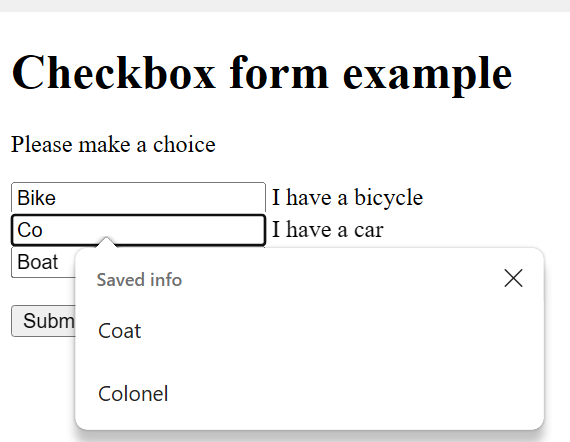
An example of this feature is displayed below:
In the screenshot above the user is typing the letters "Co" in the second text input and the browser is offering earlier typed values that also start with these two letters.
This is with the property GeneralAutofillEnabled set to true.
If you set the property to False then the browser will not offer any earlier typed data.
Setting the property immediately changes the AutoFill behavior for the currently loaded page and keeps that setting if you navigate to another page.
In the Microsoft .Net interface this is called the CoreWebView2Settings.IsGeneralAutofillEnabled property.
AntView - The MS Edge WebView2 ActiveX control Date last changed: 2026/07/30