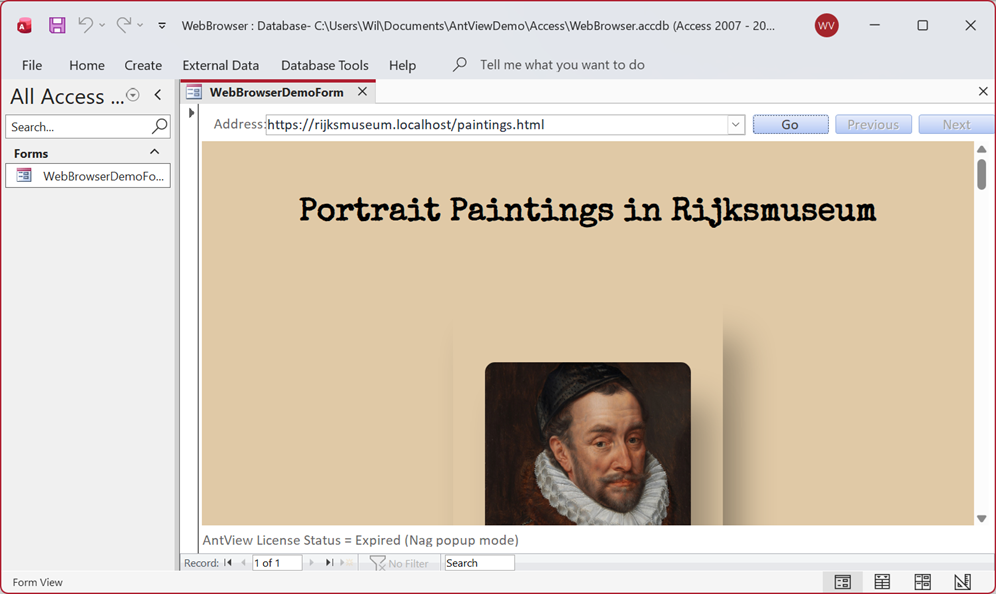
MS Access - Web Browser example
File(s): WebBrowser.accdb, html\paintings.html
This example shows you how-to use the control as a basic browser.
First look at the Form_Load event.
Private Sub Form_Load()
Dim eStatus
Dim LicenseText As String
LicenseText = "AntView License Status = "
EdgeWebBrowser.UnlockControl "ExampleCompany", "WI5PO2-2KSU3Q-HWFXFU-IUMU2V-QF8P2F"
eStatus = EdgeWebBrowser.UnlockStatus
If eStatus = usLicensed Then
LicenseText = LicenseText & "Licensed"
End If
If eStatus = usDemoLicense Then
LicenseText = LicenseText & "Demo with " & EdgeWebBrowser.DemoDaysLeft & " Days Left"
End If
If eStatus = usUnlicensed Then
LicenseText = LicenseText & "Expired (Nag popup mode)"
End If
DemoLabel.Caption = LicenseText
AddressComboBox.AddItem "https://www.antwise.com"
AddressComboBox.AddItem "https://www.antwise.com/Edge-WebView2-ActiveX.htm" ' will redirect to antview.dev
AddressComboBox.AddItem "https://rijksmuseum.local/paintings.html" ' shows our local file paintings.html, see MapLocalFolderToHostName
AddressComboBox.AddItem "https://todo.kasiban.com" ' stores data in the local browser indexed db, can test to see what happens if you delete the cache directory
AddressComboBox.AddItem "https://badssl.com/download" ' for testing client certificates
AddressComboBox.AddItem "https://docs.microsoft.com/en-us/dotnet/api/microsoft.web.webview2.core"
AddressComboBox.AddItem "https://docs.microsoft.com/en-us/microsoft-edge/webview2/reference/win32/"
AddressComboBox.AddItem "antview://about"
EdgeWebBrowser.CreateWebView
' Resizing of the AntView control has to be done manually
Form_Resize
End Sub
First we apply the license to the AntView control via UnlockControl and check if it was accepted with UnlockStatus. That result is then displayed on a label object underneath the control.
Next up we add a few URL's to a combo box control that holds the URL to navigate and create the browser processes in the background via CreateWebView.
The "antview://about" URL is a special URL that shows additional information about our AntView control and is useful for immediate diagnoses in times of trouble. See aso the AntViewAboutPageEnabled property for more info.
The last line is calling Form_Resize as we can't use the standard anchoring that is used for the standard controls in MS Access.
The resizing looks like this:
Private Sub Form_Resize()
On Error Resume Next
EdgeWebBrowser.Width = Me.InsideWidth - 420
EdgeWebBrowser.Height = Me.InsideHeight - (AddressComboBox.Height) - (DemoLabel.Height) - 450
End Sub
When the background browser processes are done creating the out of process browser control, an OnCreateWebviewCompleted event will be raised.
Private Sub EdgeWebBrowser_OnCreateWebviewCompleted(ByVal HResult As Long)
MapLocalFolderToHostName
End Sub
Private Sub MapLocalFolderToHostName()
Dim Path As String
Dim HostName As String
Path = CurrentProject.Path & "\html"
HostName = "rijksmuseum.local"
EdgeWebBrowser.SetVirtualHostNameToFolderMapping HostName, Path, hrakAllow
End Sub
We use this event to set up a local folder, the "html" folder underneath our project path, as a internal host name "rijksmuseum.local", which you can see in action in our screenshot above. We do this via the SetVirtualHostNameToFolderMapping method. This also allows us to apply CORS rules on a html document that is hosted in a local folder. Something that is otherwise restricted for local folders in a normal browser.
Private Sub EdgeWebBrowser_OnHistoryChanged()
PreviousButton.Enabled = EdgeWebBrowser.CanGoBack
NextButton.Enabled = EdgeWebBrowser.CanGoForward
End Sub
The OnHistoryChanged event is used to dynamically enable our Previous and Next buttons by querying the CanGoBack and CanGoForward properties.
AntView - The MS Edge WebView2 ActiveX control Date last changed: 2026/07/30